

Telemetry software turns data from remote devices and systems into operational insight. A custom telemetry management system automates data collection and transmission. Its development cost depends on the integrations, telemetry attributes, routing and security controls, and implementation scope required.
Design decisions matter as much as the dashboard. Custom attributes can help teams compare performance by deployment cohort, region, or event type. But inconsistent naming or excessive detail can weaken analysis and expose data unnecessarily.
This article explains what telemetry software does and how tailored attributes support operational decisions. It covers routing and alerts, integration and security, and the factors that shape development time and cost. Use it to define system requirements, assess trade-offs, and align the build with the decisions your teams need to make.
Key Takeaways
- Define telemetry around the operational decisions it must support, then select data sources and views to match those decisions.
- Use consistent, purpose-driven attributes to compare events and improve diagnosis without creating noisy, high-cardinality data.
- Structure routing and alerting around meaningful service indicators, affected cohorts, and clear response actions.
- Plan integrations, security controls, and versioned event definitions as core design requirements, not late-stage additions.
- Estimate development effort by mapping system scope, data complexity, integration needs, and security requirements before implementation begins.
Why do custom telemetry attributes improve observability and operational decision-making?
A custom telemetry management system can align event fields, storage, and analysis with an organization’s operational decisions. Commercial platforms offer standardized capabilities, while a custom design can fit specific data sources and workflows but needs deliberate design and maintenance. The right choice depends on how well standard models support the decisions your teams need to make.
Start with the data source and the action each record must support. Application logs can capture errors and feature use; sensors report equipment condition, while infrastructure metrics describe server performance. Give each event a stable name, timestamp, source, and operational category. For example, a pump event labeled “pressure_drop” can be compared across equipment groups and operating periods.
Storage structure determines whether those records remain useful. In a log analytics database, keep consistent fields for event type, asset class, deployment cohort, and severity. Use an approved attribute model for each telemetry type, and give every custom field a clear purpose. According to South African Institute of Mining and Metallurgy, the system transmits data using the U.S. Geological Survey’s RS-232 digital telemetry format.
Controlled attributes improve analysis; unbounded values can undermine it. A unique event ID distinguishes records, while stable values such as “production” or “test” support reliable grouping. Avoid adding a unique customer identifier to every event unless the analysis requires it. High-cardinality fields can fragment results, slow queries, and weaken anomaly detection.
Log Analytics and Kusto Query Language (KQL) support focused investigations. Filter records by event name and time, group errors by server class, then compare affected cohorts. A rise in failures on one server class, for example, may point to infrastructure drift. Similar failures across environments may instead suggest an application regression or shared dependency. KQL makes these comparisons repeatable.
Power BI can present analyzed telemetry as operational reports, using time charts and category breakdowns. Tie each report to a decision: show recurring events by day, compare error trends by asset class, or identify which application functions are used. Teams can then assign follow-up actions based on recurring patterns rather than isolated records.
Machine-learning analysis can add anomaly detection when event definitions and historical data are consistent. Treat model output as a triage signal, not a root-cause conclusion. First isolate the event type, affected cohort, and time window; then compare logs, sensor readings, and deployment changes. Root-cause analysis can test whether a failure follows one server class, a recent release, or a shared dependency.
Telemetry routing and alerting
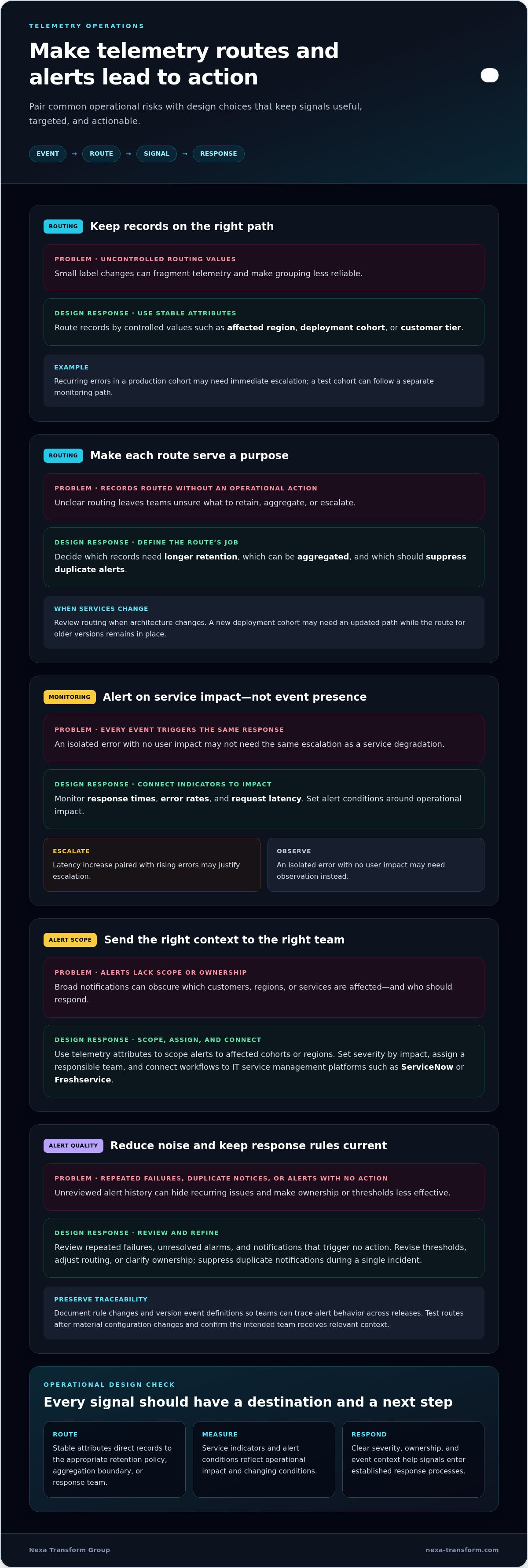
Scale telemetry with consistent routing rules, monitored service indicators, and versioned event definitions. Review alert outcomes and update rules when deployments, operating conditions, or response procedures change.
Telemetry Routing
Route records using stable attributes such as affected region, deployment cohort, or customer tier. These fields can direct telemetry to the appropriate retention policy, aggregation boundary, or response team. For example, recurring errors in a production cohort may need immediate escalation, while a test cohort can follow a separate monitoring path. Keep routing values controlled so small label changes don’t fragment data.
Define each route around an operational action. Decide which records need longer retention, which can be aggregated, and which should suppress duplicate alerts. Review these decisions when the service architecture changes. A new deployment cohort, for example, may need updated routing while the existing path remains in place for older versions.
KPI Monitoring and Alerts
Choose indicators that connect telemetry to service performance, such as response times, error rates, and request latency. Set alert conditions around operational impact, not simply the presence of an event. A latency increase paired with rising errors may justify escalation; an isolated error with no user impact may need observation instead.
Use telemetry attributes to scope alerts to affected cohorts or regions. Machine-learning-based thresholds can help account for changing baselines. Tie each threshold to a clear action, such as investigating service degradation or reviewing a deployment. Reassess it when traffic patterns or operating conditions change.
Alert and Alarm Management
Alert management turns signals into triage, ownership, and follow-up. Set alarm severity according to impact, assign a responsible team, and suppress duplicate notifications during a single incident. Connect alert workflows to IT service management platforms such as ServiceNow or Freshservice so incidents enter established response processes.
Review alert history for repeated failures, unresolved alarms, and notifications that trigger no action. Each pattern may point to an improvement: revise a threshold, adjust routing, or clarify ownership. Document rule changes and version each event definition so teams can trace alert behavior across releases.
Operational discipline also means maintaining the path from event to response. Test routes after material configuration changes, then confirm that the intended team receives the relevant context. For a delayed equipment signal, the alert should identify the affected asset group and point responders toward the next diagnostic step. A custom digital system can support tailored operational workflows where standard processes don’t fit.
What is telemetry software?
Telemetry software automates collecting and transmitting data from remote sources, making system condition available for analysis. Support the protocols and formats already used by connected devices; according to South African Institute of Mining and Metallurgy, the system transmits data using the U.S. Geological Survey’s RS-232 digital telemetry format.
Telemetry Data Collection
Collection starts at a source, such as an application, database, sensor, or embedded device. The software captures readings or events, adds context such as source and timestamp, then sends records to a central store. Define the operational decision each field supports before collecting it. For example, a temperature reading needs an equipment identifier for asset-level investigation.
Telemetry systems can collect, monitor, and analyze device data across networks. A practical design maps each source to its event fields, transmission path, and destination. Keep event definitions documented and versioned, so changes don’t silently disrupt applications that depend on existing fields.
Real-Time Acquisition and Monitoring
Real-time acquisition moves readings from devices into monitoring views as they arrive. For critical operations, edge computing can process data locally, reduce latency, and send selected records onward. A site can use this approach to flag a sensor threshold locally while retaining records for broader analysis.
Monitoring software can provide a central view of operations even when users are hundreds of miles away. Arrange dashboards around decisions: equipment condition, application errors, or service performance. A time chart can reveal a developing change; a table can show the source records behind it.
Sensor Data Categorization
Sensor readings become more useful when grouped by time, equipment category, or operating state. Telemetry can group data by time alone or by time and a category. For example, grouping vibration readings by machine class can show whether a pattern affects one asset type or the wider fleet.
Display categorized data in tables, time charts, and breakdown widgets. Keep category names consistent across devices so comparisons remain meaningful. Define approved fields for each telemetry type, and avoid fields without a clear operational purpose.
Classification also supports privacy and controlled analysis. Separate operational categories from sensitive identifiers, and collect only fields needed for a defined use. Overly granular attributes can expose customer identifiers, internal topology, or deployment patterns in logs and traces.
To optimize the design, map each source to a decision, then select its fields, format, and dashboard view. A maintenance team, for example, may need equipment state and event time, while an application team needs feature-use events. This sequence keeps collection useful without turning every available reading into a stored record.
Custom telemetry software integration and security
A custom telemetry management system should connect relevant devices, business software, and databases without disrupting existing operations. Core features include source connectors, documented event definitions, controlled configuration, secure transmission, and clear monitoring outputs.
Design the system by mapping each source to its data, destination, and operational use. Then define event fields, integration boundaries, security controls, and deployment environments. Build and test connections incrementally, documenting each event definition and version so application changes don’t break existing integrations.
Industrial integration starts by identifying the equipment signal and its source interface. For a sensor or machine controller, map readings to consistent asset identifiers, event times, and operating states. Camera integration can capture operational signals such as device availability or recording errors. Access to image data should follow defined permissions and retention rules.
Cloud integration creates a route between field devices, local gateways, and cloud databases or business applications. Specify which records move upstream, how transmission failures are handled, and where records remain available during connectivity loss. Local processing can reduce latency for critical operations; centralized cloud analysis can combine data from separate environments.
Automated diagnostics should turn a telemetry event into a usable incident record. Connect alerts to IT service management platforms such as ServiceNow or Freshservice, then map event severity, affected asset, and diagnostic context to the relevant workflow. Responders can then trace a signal from detection through assignment and resolution.
Security controls should include encryption, secure transmission protocols, and alignment with relevant industry standards. Review each field before collection: overly detailed telemetry can expose customer identifiers, internal topology, or deployment patterns in logs and traces. Limit access by role, protect stored records, and test configuration changes across development and production environments.
Common implementation risks include incompatible interfaces, inconsistent event definitions, sensitive data exposure, and broken integrations after a change. Version event schemas, test representative devices, and validate downstream consumers before release. For example, a camera status field should retain its meaning when software or equipment configuration changes.
Build in controlled stages: document source systems, define operational requirements, establish security and data models, integrate a representative device, then validate end-to-end transmission and incident handling. Expand after confirming that records reach the intended database and diagnostics provide actionable context. This approach improves reliability and exposes integration defects before wider deployment.
When software changes, preserve the meaning of each camera status field and verify the updated application’s sensor calls against the telemetry definitions. The custom telemetry system and the application containing its sensor calls are deployed on the server, so include both in deployment planning and treat them as connected parts of the implementation.
Monitoring guidance recommends connecting telemetry systems to ITSM platforms such as ServiceNow and Freshservice. Keep this connection in view when defining how telemetry supports monitoring, so operational signals can be associated with the relevant ITSM workflow. Plan the integration alongside the server deployment and sensor-call application, not as a separate monitoring concern.
Custom telemetry software development timelines and costs
Development effort depends on what the system must collect, connect, process, and present. A build covering a few defined sources differs from one integrating industrial sensors, business databases, alert workflows, and analytics. Scope, data quality, security requirements, and operational testing shape delivery stages and cost.
Start with a requirements map. List each source, the metrics it produces, the decision those metrics enable, and the destination for each record. For example, a production temperature sensor may need an equipment identifier, a timestamp, and a defined route to an operations dashboard. This map exposes gaps before development begins.
Integration complexity is a major cost driver. Existing devices may use different interfaces, event formats, and transmission paths. Each connection needs configuration, validation, and documented behavior. Adding a database or IT service management workflow also introduces dependencies that can affect sequencing and testing.
Data volume and processing requirements shape the technical scope. Retention choices, aggregation rules, dashboard detail, and anomaly analysis all affect storage and compute design. A system that summarizes equipment metrics has different requirements from one that retains detailed event records for investigations.
Security and production readiness also take planned effort. Define access controls, encryption, secure transmission, and procedures for handling sensitive attributes. Test representative devices and failure conditions before production release. Versioned event definitions help teams assess changes and avoid breaking applications that depend on existing telemetry.
Use staged delivery to control uncertainty: agree on operational requirements, validate a representative data path, build integrations, then test dashboards and response workflows. Each stage should have an acceptance criterion, such as confirming that a sensor record reaches its intended destination with the required context. This makes scope changes visible before they spread.
Budget drift is a material planning risk. Zipdo reported that over half of software projects almost double their initial budget. Reduce exposure by documenting assumptions, separating essential capabilities from later enhancements, and reviewing change requests against operational value. A custom system’s price depends on the project and is provided after a quote request; key cost factors include integrations, data complexity, security, and testing.
Before production, assign ownership for event definitions, monitoring rules, and ongoing maintenance. A named owner can assess whether a proposed metric still supports a decision and whether a configuration change affects downstream users. To structure requirements and delivery priorities, map your custom telemetry management system scope before development starts.
Telemetry software can analyze real-time and historical data to support decision-making, resource optimization, and operational strategies while managing strict security requirements. Zipdo reported that 31% of software projects are cancelled before completion.
Nexa Transform Group: Website Designing & Hosting
Nexa Transform Group helps organizations turn operational requirements into practical digital systems. Its Custom Digital Systems and Business Process Management (BPM) services are relevant when telemetry requirements involve defined workflows, data handoffs, or reporting processes that need to align with existing operations.
Workflow Automation & Digital Forms can support structured information capture and process coordination, while Website Designing & Hosting can address web-based presentation needs. The right scope depends on the operational problem: clarify what information teams need, which decisions it should support, and how work should proceed after a signal or event.
For a disciplined starting point, outline the processes and system requirements telemetry must support. Contact Nexa Transform Group to discuss your digital systems requirements.
Set the next decision in motion
Turn technical requirements into an accountable implementation brief. Identify the operational owner, the decisions the system must support, and the boundaries for future changes. This brief helps your team prioritize a custom telemetry management system around operational value rather than feature volume.
Nexa Transform Group can support the wider digital framework through Website Designing & Hosting, Business Process Management (BPM), and Workflow Automation & Digital Forms. These services can help align a custom telemetry management system with the processes and information flows teams rely on. Define the operational need first, then establish the appropriate project scope.
Bring your requirements into a focused discussion and set a practical direction for implementation. Contact Nexa Transform Group to discuss your custom telemetry management system requirements and take the next step with clarity.
Frequently Asked Questions
What is a custom telemetry management system and how does it work?
A custom telemetry management system gathers selected operational signals and makes them usable for analysis and action. For example, a maintenance team could combine equipment status with service records to prioritize inspections. The workflow moves data from source devices or software into processing, storage, and reporting. Clear event ownership helps operational users interpret records consistently and assign follow-up work.
How much does it cost to build and operate a tailored telemetry platform?
Cost depends on project scope and is provided after a quote request. Key factors include data sources, integration complexity, storage and processing needs, security controls, reporting, and maintenance. Connecting an existing database differs from adapting legacy equipment interfaces. Operating costs also reflect data retention, infrastructure choices, and the work required to maintain integrations as devices or business processes change.
What cloud, on-premises, and hybrid deployment options are available?
Cloud deployment centralizes processing and access, while on-premises deployment keeps the system within infrastructure your organization controls. A hybrid design can process time-sensitive signals locally and transfer selected records to cloud services for broader analysis. Choose based on connectivity, data control, latency, and integration needs. A remote site with intermittent connectivity, for example, may need local buffering before records synchronize.
How can telemetry data be secured, governed, and kept compliant with privacy regulations?
Secure telemetry by limiting collection to necessary fields, controlling access, protecting data in transit and storage, and documenting retention decisions. Assign owners for data definitions and permissions, then review them as system use changes. For example, separate equipment status from customer-identifying fields when the operational task doesn’t require them. Map applicable privacy obligations to data flows, access practices, and retention procedures.
How do you integrate telemetry with existing devices, software, and analytics tools?
Start by inventorying device interfaces, software endpoints, and analytics destinations. Map source fields to shared event definitions, then test one representative integration before expanding. Validate that a controller’s status code retains its meaning in the database and reporting tool. Document dependencies and test changes against downstream applications so updates don’t disrupt existing workflows or change how teams interpret operational records.
What telemetry data standards and protocols should the system support?
Support the protocols and formats already used by connected devices. The article names the U.S. Geological Survey’s RS-232 digital telemetry format and recommends secure transmission protocols.


