

A portal can digitise a broken process with impressive efficiency. The process will still be broken. Effective operational portal development starts by defining how work should flow, then translating that design into secure digital capabilities. For leaders dealing with fragmented information, inconsistent handoffs, and unclear requirements, the central question is how to build a portal that fits the way the organisation actually works.
The answer is disciplined process design before interface decisions. When requirements are vague, teams face rework, scope expansion, and a system that reproduces existing friction instead of removing it. This article explains how to turn operational needs into defined portal requirements, establish roles and controls, and connect development decisions to measurable outcomes.
We’ll examine the development stages, from workflow mapping and improvement priorities to bespoke engineering, integrations, digital forms, and automation. We’ll also cover security, governance, controlled delivery, and the operational measures owners can use to assess performance after deployment. The goal is to align process architecture and portal capability around a clear purpose.
Key Takeaways
- Operational portal development should address the causes of workflow friction, not simply digitise delays and duplicate entry.
- Use BPMN 2.0 to clarify process steps, handoffs, decisions, roles, and exception paths before setting portal requirements.
- Choose centralised, federated, or hybrid information patterns based on ownership, latency, and change control, with a defined source of truth for each integration.
- Deliver in controlled phases, assigning accountability for process ownership, product decisions, data stewardship, and technical delivery.
- Connect process analysis with bespoke software engineering to shape portal scope around operational priorities.
Why operational portal development must start with workflow friction
Operational portal development should begin with the work itself, not a catalogue of screens or features. An operational portal is a role-based digital workspace that supports defined organisational workflows. Users access relevant information, complete tasks, make or record decisions, and hand work to the next responsible person. Its purpose is to coordinate execution across process boundaries, not simply to put existing documents online.
Separate visible symptoms from their causes. A delayed approval may look like a reminder problem, but the underlying cause could be unclear decision authority, incomplete submission requirements, or an approval step that adds no control value. Duplicate entry may point to disconnected records, but it can also mean teams have not agreed which system owns the information. Digitising a symptom without diagnosing the cause can preserve the same defect in a new interface.
A portal is most useful when work recurs across roles or functions and requires coordinated status, information, decisions, or handoffs. If the need is limited to publishing a report or making a document easier to find, a focused reporting or information-access solution may be more proportionate. Choose the intervention based on the work, not the appeal of a new platform.
Which operational problems justify a portal?
Look for recurring handoff delays, fragmented records, approval bottlenecks, and poor visibility into who owns the next action. These are portal candidates when several roles need to act on shared workflow information. A standalone reporting need, by contrast, may be addressed by improving access to reliable data without introducing task management.
The diagnosis depends on the operating context. A manufacturing workflow might route a quality issue between production, maintenance, and supervisors. In mining, field observations may need to move through review and action ownership. A public service process could coordinate an application across assessment and approval. Field operations may need to connect task assignment, evidence capture, and office review. These are examples, not universal cases. Map the actual work before choosing a digital intervention.
What separates an operational portal from a standard website?
A standard website primarily presents public-facing information. An operational portal supports authenticated users as they complete tasks, access role-specific information, and progress work according to defined responsibilities. The broader Enterprise Portal concept provides useful context for integrated access. The operational purpose, however, comes from the workflows the portal enables.
Set clear boundaries around the process. Define who uses the portal, what each role needs to see or do, where decisions happen, and what information must pass between teams. A maintenance coordinator, site supervisor, and field worker may need different views of the same work item because their responsibilities differ. Internal developer portals serve engineering-specific needs and are not a default model for other functions. A portal earns its place when it clarifies operational ownership and coordination, rather than creating another destination for disconnected forms, email, and spreadsheets.
How process architecture shapes operational portal requirements
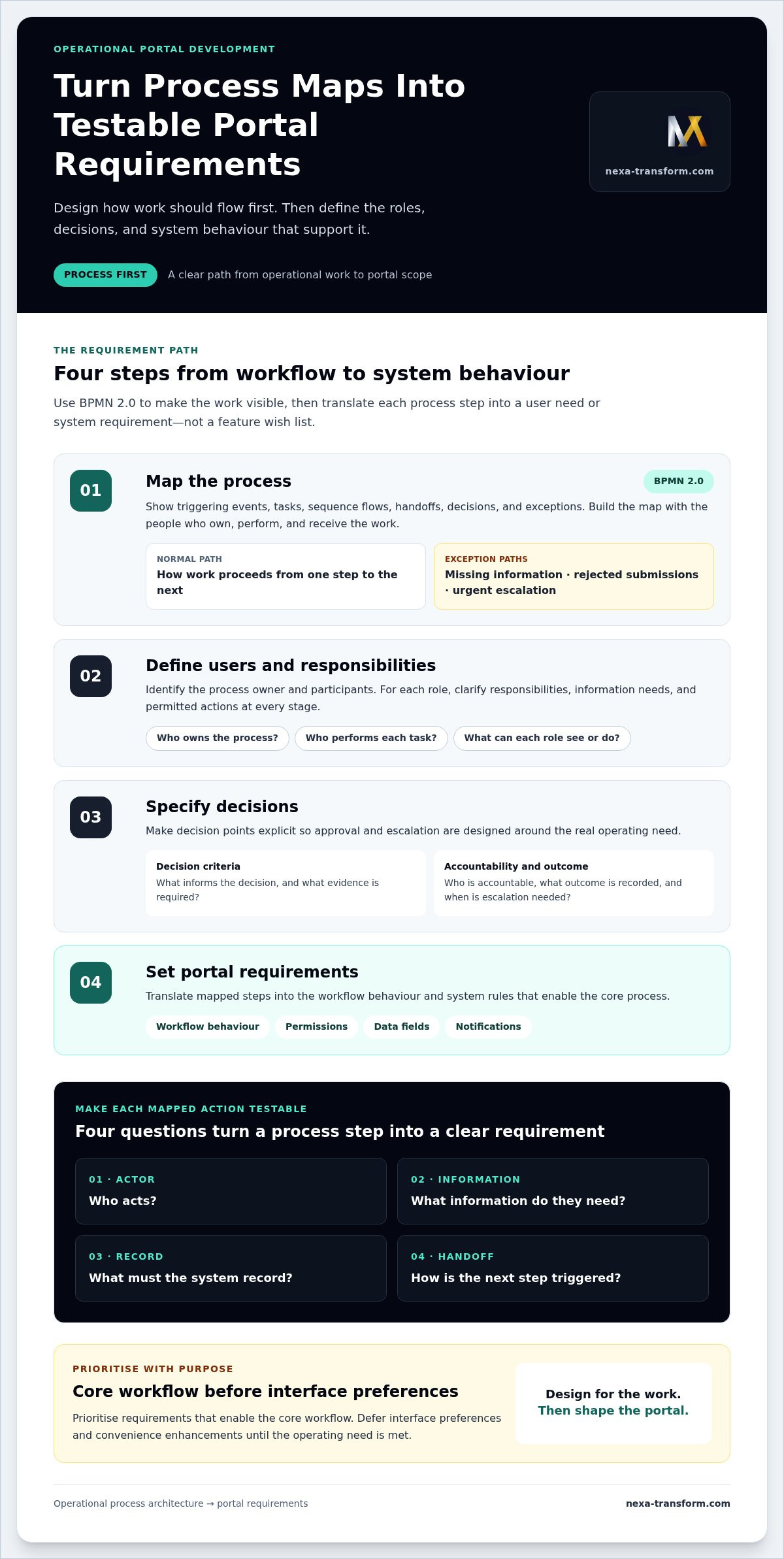
Operational portal development turns a mapped way of working into clear user needs, system behaviour, and acceptance criteria. Start with the process, not a preferred screen or feature. BPMN 2.0 can represent events, tasks, gateways, handoffs, and exception paths, giving operational and technical teams a shared view of how work moves and where requirements arise.
Map roles, handoffs, and exceptions before designing screens
Build the process map with the people who own, perform, and receive the work. Document the process owner, participants, required inputs and outputs, decision points, and escalation routes. Process workshops help reconcile formal procedures with actual practice, including informal workarounds that affect delivery. Map both the normal path and exceptions, such as missing information, rejected submissions, or urgent escalation. These paths shape permissions, task routing, records, and notifications.
A process map becomes a testable portal requirement when each mapped action specifies who acts, what information they need, what the system must record, and how the next step is triggered.
Turn process maps into prioritised requirements
Translate each process step into a user need or system requirement, not a feature wish list. For example, a decision point may require a defined approver, access to specific supporting information, and a recorded outcome. Prioritise requirements that enable the core workflow. Defer interface preferences and convenience enhancements until the operating need is met.
- Map the process. Use BPMN 2.0 to show triggering events, tasks, sequence flows, handoffs, decisions, and exceptions.
- Define users. Identify each role, its responsibilities, information needs, and permitted actions at each stage.
- Specify decisions. Record decision criteria, accountable roles, required evidence, outcomes, and escalation conditions.
- Set requirements. Define the workflow behaviour, permissions, data fields, notifications, and decision records needed to support the mapped process.
- Validate priorities. Confirm requirements with process participants and set acceptance criteria that show whether each one works as intended.
For example, an approval requirement should state which role can approve, what information must be available, how a rejection is recorded, and where the work goes next. “Add an approval dashboard” is a feature request. “Route complete submissions to the authorised role and record the decision before advancing the task” can be tested against the process.
Acceptance criteria should cover routine completion and relevant exceptions. A test might verify that an incomplete submission returns to the responsible role with the missing information identified, rather than proceeding as if it were complete. Requirements should also identify the source and owner of data, so teams can distinguish information to capture from information to retrieve.
Institutional examples illustrate how portal purposes can vary: Ithaca College Applications and Portals includes an IC Service Portal for IT and HR requests, alongside a CAPS/Athletics Portal. The practical lesson is to define each portal around its users and service process. A BPM-led requirements process connects that definition to business process management and bespoke digital systems engineering.
Operational portal architecture: integrate systems without adding friction
Integration should follow operational ownership, not a goal of connecting every available system. For each information exchange, define its purpose, authoritative source, accountable data owner, required freshness, and the action it supports. Without these decisions, a portal can display conflicting records, duplicate updates, or introduce delays just when teams need reliable information.
Integration quality depends on clear ownership and consistent data meaning, not on the number of connections a portal can make.
Choose an integration pattern around operational ownership
Architecture choices determine where records are governed, how quickly changes appear, and who controls updates. Select a pattern for each data domain based on the organisation’s operating model and change controls.
- Centralised: A designated system governs a data domain and its updates. This can provide a clear record authority, while making that system’s availability and update process important to dependent work.
- Federated: Authoritative information stays in established source systems, while the portal provides access or workflow context. This preserves ownership, but users may depend on source-system responsiveness and access rules.
- Hybrid: Different domains use different patterns. For example, a portal may manage workflow status centrally while retrieving reference information from an authoritative source. Use this approach where ownership genuinely differs, and document the boundary.
For each integration, record what is exchanged, which system creates or changes the data, how freshness affects the task, and what happens if a source is unavailable or a record conflicts. An API can enable controlled information exchange, but it cannot resolve unclear ownership or inconsistent definitions. The U.S. Office of Personnel Management Developer Center provides a government example of API and open-data resources for application development. Operational use still depends on the purpose and governance of each data flow.
Design roles, access, and information boundaries
Identity and permissions should reflect operational responsibility. Map each user role to the actions it must perform, the organisational units it serves, and the information needed for those actions. Apply least-necessary access to sensitive process data, and define how access changes when responsibilities change. Avoid broad access simply because a role participates somewhere in a workflow.
Auditability also needs a defined purpose. Specify which actions require a record, such as submission, reassignment, approval, or amendment, and what context makes that record useful for operational review. Data minimisation supports this discipline: collect and expose only information needed for the defined process. Give users a clear route to current records in their authoritative systems, rather than encouraging local copies that can become competing versions.
Security controls and applicable obligations are project-specific design inputs. Identify relevant organisational policies, data sensitivity, access boundaries, and applicable requirements during architecture planning, then translate them into testable controls. This makes security part of the operating design, not a final interface adjustment. Nexa connects bespoke digital systems engineering with workflow automation and digital forms to support defined processes.
How to deliver operational portal development in controlled phases
Controlled delivery keeps process decisions, technical work, and operational accountability aligned. In operational portal development, each phase should resolve a defined uncertainty before scope expands. Establish a baseline first, then use evidence from design, testing, and live use to guide the next release.
Assign decision rights early. A process owner is accountable for the workflow and its operating rules. A product decision-maker prioritises requirements and resolves scope trade-offs. Data stewards govern information quality and meaning. Technical leads own architecture, integration, and delivery controls. Different people can hold these responsibilities, but they must be explicit.
- Baseline: Record current workflow measures, known failure points, and adoption context. Define what the portal is intended to change.
- Process design: Confirm the target workflow, responsibilities, decision rules, and exception handling with the people who perform the work.
- Prototype: Test key user journeys and information needs before committing to a complete build. Use feedback to resolve usability and process assumptions.
- Build: Develop the agreed workflow capabilities, roles, records, and controls against prioritised requirements and acceptance criteria.
- Integration: Connect only the systems needed for the operating process, with data ownership and failure handling defined.
- Pilot: Run a bounded workflow with representative users, then assess performance, exceptions, access, and handoffs.
- Controlled expansion: Address pilot findings before extending to additional roles, workflows, or operating units.
This phased approach aligns with Nexa’s digital systems and transformation capabilities, connecting process analysis with bespoke engineering and delivery governance.
Pilot a complete workflow before scaling
Select a workflow with a clear owner, defined user group, and observable measures. Test routine cases and exceptions with representative users, including permissions, handoffs, and incomplete information. A pilot should exercise the end-to-end process, not just demonstrate screens. Record defects and operational feedback, refine requirements, and define rollout controls before widening access or scope.
Measure portal performance through operating outcomes
Set baseline measures before launch, then review relevant indicators such as cycle time, incomplete records, rework, and approval delays. Pair these with adoption signals, such as whether intended roles use the portal to complete their assigned work, and qualitative feedback about friction points. Measures should reflect the process purpose, not activity for its own sake.
Establish a review cadence and name an owner for each response. If adoption is low, investigate access, training, or workflow fit. If rework rises, examine data quality and process rules. Compare results with the baseline, document decisions, and prioritise corrective action. Expand only when evidence shows the workflow is usable, governed, and performing its intended operational function.
Nexa’s approach to bespoke operational portal development
Nexa combines business process management, operational analysis, and bespoke software engineering to shape portals around defined work. The sequence matters: understand how the organisation operates, identify where coordination or control needs improvement, then determine what the digital system must support. This connects process decisions to portal scope instead of treating software features as the starting point.
Align operational analysis with software engineering
Process discovery examines users, responsibilities, bottlenecks, decision points, information needs, and handoffs. BPMN 2.0 can make workflow steps and exception paths explicit, while improvement methods help investigate where performance breaks down. 5S, DMAIC, Ishikawa (Fishbone 6M), and 5-Why methods can inform the analysis where relevant. The objective is not to apply every method, but to select an appropriate lens for the operational issue.
Technical scope follows the operating model. A mapped process may indicate that a portal needs a structured digital form, a decision record, role-specific task access, or an integration with an existing system. Each implementation choice should have a clear operational purpose and an accountable owner. Governance, data stewardship, and process ownership belong in the design, not on a list of issues to resolve after deployment.
This connection also supports continuous improvement. As operating conditions or process requirements change, owners can assess whether the workflow, supporting forms, automation, or portal capabilities still serve their intended purpose. Analysis and engineering work together: one defines the need, the other translates it into a tailored digital capability.
Scope the engagement around the operating environment
Organisations differ in workflow structures, users, approval paths, information controls, and system landscapes. A public service process may require clear review stages and decision records. Manufacturing or mining operations may involve coordination between operational teams, support functions, and field users. Private-sector workflows also vary by process and governance. These contexts inform design, but none should be treated as a template for every organisation.
Nexa serves private and public organisations across all nine South African provinces and internationally. That reach does not mean every project has the same requirements. Portal scope is shaped by each organisation’s users, process boundaries, integrations, and operating conditions. Custom digital systems, workflow automation, and digital forms can support defined needs, while mobile and field operations applications may fit workflows that extend beyond a central office. The requirement determines the capability.
A disciplined scope connects each proposed component to an operational need, a responsible owner, and a way to assess whether it supports the process. This keeps bespoke software engineering grounded in process improvement and avoids expanding the portal around features without a clear role in execution.
Learn how Nexa Transform Group connects process analysis with bespoke system design.
Set the next portal decision with operational intent
Start by identifying one workflow where clearer coordination would matter, then define the result the organisation needs. Name the accountable process owner, the teams involved, and the operational measure that would indicate progress. This gives early planning a practical boundary and keeps operational portal development anchored to a business purpose.
Use that starting point to frame decisions about scope, governance, and delivery. A portal should earn each added workflow, integration, and user group through a clear operational need. That discipline leaves room to adapt without allowing requirements to expand unchecked.
Nexa brings process and system design together to help organisations shape portal requirements around their operating environment. Discuss an operational portal with Nexa Transform Group and define a sound starting point for your project.
With a clear purpose and accountable ownership, your portal can become a practical foundation for better-coordinated work.
Frequently Asked Questions
What is operational portal development?
Operational portal development is the design and creation of a digital system that helps people carry out organisational work through connected tasks, information, and decisions. A portal might support a work request from submission through review, assignment, completion, and closure. Its value depends on whether it supports the required operating outcome, such as a complete record or clear task status, rather than simply providing another place to store documents.
How is an operational portal different from an internal developer portal?
An operational portal supports workflows across business or service functions, while an internal developer portal is designed for software engineering teams and their development tools. For example, an operations portal could coordinate an inspection request between a field worker and a supervisor. A developer portal might instead present engineering resources or service information. The distinction is the user responsibility and work being supported, not whether access is internal to the organisation.
Can an operational portal integrate with existing business systems?
Yes. A portal can be designed to exchange information with existing systems when the required interfaces, access controls, and data rules support it. For instance, it could display a reference held in one system while recording a separate workflow decision in another. Define which system owns each record and how updates are handled before designing the connection. Integration should serve a specific operating task, not create unnecessary data movement.
How do you decide what to include in an operational portal MVP?
Choose the smallest complete scope that lets a defined group finish a valuable workflow, including its necessary decisions and records. For a service request, that might mean capturing required details, routing the request, recording its status, and closing it with an outcome. Exclude features that do not support this path directly. Document what the first release leaves out so later additions can be prioritised against evidence and operational need.
How should an organisation measure whether its operational portal is working?
Measure whether the portal supports the intended work, not only whether users log in. Compare a relevant operational indicator before and after rollout, such as the time from request submission to assignment or the proportion of records returned for missing information. Interpret the result alongside usage patterns and user feedback. A change in the metric should prompt investigation, since process changes, workload, or data quality may also affect performance.
Does operational portal development require changing existing processes?
Not necessarily. Some workflows may only need clearer roles, consistent information capture, or better coordination. Others contain duplicated approvals or unclear exception handling that should be addressed before those steps are digitised. The organisation can retain necessary controls while changing how work moves between them. Treat process changes as explicit decisions: identify the issue, agree the revised method with accountable owners, and update guidance alongside the portal.
What should be defined before operational portal development begins?
Define the business purpose, workflow in scope, accountable process owner, intended user groups, and outcome the portal must support. Also identify essential information, existing systems involved, access boundaries, and known exceptions. Agree how requirements will be prioritised and tested, and establish a baseline for evaluating performance. These inputs give operational and technical teams a shared basis for estimating scope and resolving trade-offs during delivery.

